Quick answer
Our overall pick is the Brother P-Touch PT-N20, a desktop model that balances a full keyboard with creative features. Other picks suit those needing portability, wide labels, or heavy-duty industrial use.
A label maker is a powerful tool for bringing order to drawers, bins, and shelves. With so many models available, choosing the right one can be confusing. We compared the manufacturer specifications and listed features of 13 widely used label makers to help you find the best label makers for organizing your home, office, or workshop.
Quick picks
- Best overall desktop model: Brother P-Touch PT-N20 Desktop Label Maker (see on Amazon)
- Best ultra-portable Bluetooth printer: Nelko P21 Bluetooth Label Maker (see on Amazon)
- Best for wide labels: SUPVAN T50M Pro Bluetooth Label Maker (see on Amazon)
- Best for heavy-duty jobs: DYMO RhinoPRO 5200 Industrial Label Maker (see on Amazon)
13 Best Label Makers for Organizing compared
| # | Product | Best for | Brand | Tape Width | Power Source |
|---|---|---|---|---|---|
| 1 | Brother P-Touch PT-N20 Desktop Label Maker | Best overall desktop model | Brother | ½” (12mm) | Batteries |
| 2 | Brother P-Touch PTD210 Bundle | Best bundle with tapes included | Brother | Not listed | 6 AAA Batteries |
| 3 | Brother P-Touch PTD220 Label Maker | Best for saving frequent label designs | Brother | ~½ inch | Batteries or optional AC adapter |
| 4 | DYMO LabelManager 160 Bundle | Best for one-touch formatting | DYMO | Not listed | Batteries |
| 5 | Brother P-Touch PT-N10 Handheld Label Maker | Best compact handheld for students | Brother | ½” (12mm) | Batteries |
| 6 | Nelko P21 Bluetooth Label Maker | Best ultra-portable Bluetooth printer | Nelko | Not listed | Not listed |
| 7 | Phomemo D30 Bluetooth Label Maker | Best for continuous and fixed-length labels | Phomemo | Not listed | Rechargeable battery |
| 8 | SUPVAN T50M Pro Bluetooth Label Maker | Best for wide labels | SUPVAN | 3/4″ – 2″ | Not listed |
| 9 | NIIMBOT B1 Bluetooth Label Printer | Best for multilingual label creation | NIIMBOT | 2 Inch | Rechargeable battery |
| 10 | DYMO RhinoPRO 5200 Industrial Label Maker | Best for heavy-duty jobs | DYMO | 3/4″ (19mm) | Not listed |
| 11 | Brother PT-E720BT Industrial Label Printer | Best industrial model with Bluetooth | Brother | Up to ~1 inch | Not listed |
| 12 | Brady M210 Handheld Label Maker | Best for basic, no-frills industrial labeling | Brady | Not listed | Not listed |
| 13 | EazeID Vintage Embossing Label Maker | Best for crafting and retro 3D labels | EazeID | 3/8 inch (9mm) | Manual |
How we chose
We compared manufacturer listings and specifications on Amazon as of October 2026. We did not test, use, or review any products hands-on. Our picks are based on comparing listed features like tape width, power source, connectivity, and design functions to match different organizing needs.
Desktop & Portable Label Makers
These models are ideal for general home and office organization, often with built-in keyboards.
1. Best overall desktop model: Brother P-Touch PT-N20 Desktop Label Maker

Pros
- Desktop design with full keyboard
- Built-in cutter for clean edges
- Pre-loaded with fonts and symbols
Cons
- Requires specific Btag tapes
- Battery powered (adapter not included)
The Brother P-Touch PT-N20 is a desktop label maker with a full QWERTY keyboard and a built-in cutter. It uses Brother Btag label tapes that are ½” (12mm) wide and come in 17 colors. The listing states it has pre-loaded fonts, frames, and symbols, and can print up to two lines of text. It is powered by batteries.
Best for: This is a great choice for a home desk or workshop where you want a dedicated, easy-to-use label maker with creative options.
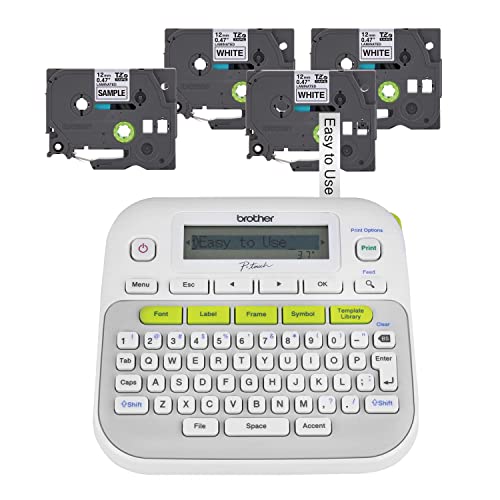
2. Best bundle with tapes included: Brother P-Touch PTD210 Bundle
Pros
- Bundle includes four label tapes
- Portable and lightweight design
- Durable laminated tapes
Cons
- Requires six AAA batteries
- The listing does not mention an AC adapter being included
The Brother P-Touch PTD210 is a portable, battery-powered label maker that comes in a bundle with four label tapes included. It prints on Brother Genuine TZe laminated tapes, which the listing states are durable for use in various conditions. It includes fonts, frames, and over 600 symbols for personalization.
Best for: This is a solid pick if you want a starter kit that includes both the machine and several tapes to begin organizing immediately.
3. Best for saving frequent label designs: Brother P-Touch PTD220 Label Maker

Pros
- Saves up to 30 labels in memory
- Can use optional AC adapter
- Familiar QWERTY keyboard
Cons
- AC adapter is sold separately
- Tape width is approximate per listing
The Brother P-Touch PTD220 is a mobile label maker for home and office. It prints on Brother TZe label tapes approximately ½ inch wide. A key feature is a built-in memory that can save up to 30 frequently used labels for reprinting. It offers fonts, frames, and symbols and can be powered by batteries or an optional AC adapter.
Best for: This model is ideal for anyone who needs to reprint the same labels often, like for recurring storage or office filing systems.
4. Best for one-touch formatting: DYMO LabelManager 160 Bundle

Pros
- Bundle includes three tapes
- One-touch smart keys
- Automatic power-off function
Cons
- The listing does not specify tape width
- Battery powered
The DYMO LabelManager 160 is a portable, handheld label maker that comes in a bundle with three label cassettes. It features a QWERTY keyboard and one-touch smart keys for fast text input. The listing mentions it has over 20 text formats and 200+ symbols, an automatic power-off function, and is powered by batteries.
Best for: This is a good option for users who want quick, smart formatting options directly on the handheld device.
5. Best compact handheld for students: Brother P-Touch PT-N10 Handheld Label Maker

Pros
- Very portable handheld design
- Built-in cutter
- Uses colorful Btag tapes
Cons
- Limited to Btag tape system
- Battery powered
The Brother P-Touch PT-N10 is a portable, battery-operated handheld label maker. It uses the same Brother Btag label tapes as the PT-N20, which are ½” wide. It has a full QWERTY keyboard, a built-in cutter, and is pre-loaded with fonts, frames, and symbols. The listing positions it for dorm rooms and student life.
Best for: This is an excellent compact option for students or travelers who need a simple, handheld labeling tool.
Bluetooth & App-Connected Label Printers
These compact, wireless printers connect to a smartphone app for extensive design options.
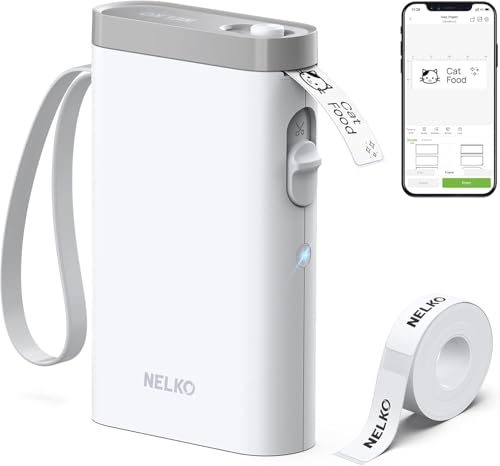
6. Best ultra-portable Bluetooth printer: Nelko P21 Bluetooth Label Maker
Pros
- Very compact and lightweight
- Inkless thermal printing
- App with templates for QR/barcodes
Cons
- Requires a smartphone and app
- The listing does not mention a rechargeable battery
The Nelko P21 is a wireless Bluetooth label maker that connects to an iOS or Android app. It uses inkless, direct thermal printing technology and has a built-in cutter. The listing describes it as half the size and weight of traditional models, with an app that provides various templates for creating labels with text, QR codes, and barcodes.
Best for: This is the top pick for maximum portability and modern, app-based label design without the need for ink.
7. Best for continuous and fixed-length labels: Phomemo D30 Bluetooth Label Maker

Pros
- Prints both continuous and fixed-length labels
- Built-in rechargeable battery
- Compact and portable
Cons
- Requires a smartphone app
- The listing does not specify print resolution
The Phomemo D30 is a mini Bluetooth label maker that supports both continuous label tapes and fixed-length labels. It uses ink-free thermal printing and connects to a dedicated app with templates. The listing states it has a built-in rechargeable battery and is half the weight and size of traditional label makers.
Best for: Choose this if you need the flexibility to print both long, continuous labels and individual, pre-cut stickers.
8. Best for wide labels: SUPVAN T50M Pro Bluetooth Label Maker

Pros
- Prints very wide labels (up to 2 inches)
- Free app with image import
- Inkless printing
Cons
- Requires a smartphone app
- The listing does not mention battery life
The SUPVAN T50M Pro is a Bluetooth label maker that prints labels from 3/4 inch to 2 inches wide. It connects to a free app that allows you to add images and customize labels with fonts, frames, and icons. It uses inkless thermal printing technology and is designed for home organization and small business use.
Best for: This is the best choice for labeling large items like storage bins, jars, or for small business product labels that require more space.
9. Best for multilingual label creation: NIIMBOT B1 Bluetooth Label Printer
Pros
- App with multilingual support
- Auto-detects label size
- Built-in rechargeable battery
Cons
- Requires a smartphone app
- Included with only one label roll
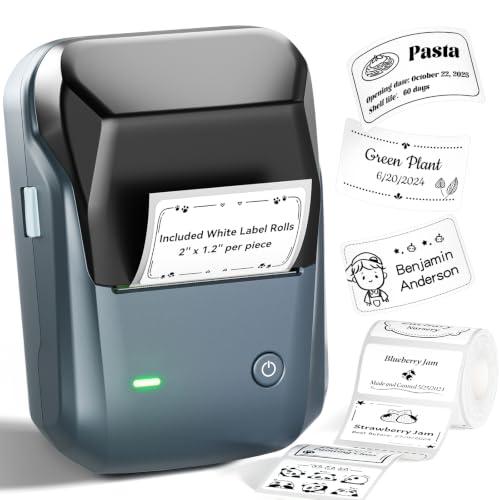
The NIIMBOT B1 is a Bluetooth label printer that works with iOS and Android devices via an app. The app auto-detects label size and offers over 30 fonts with multilingual support. It uses thermal inkless printing, has a built-in rechargeable battery, and includes a roll of white labels.
Best for: This model is well-suited for creating labels in multiple languages or for users who want an app that automatically detects label size.
Industrial & Specialty Label Makers
Built for durability and specific tasks like asset management or creating embossed labels.
10. Best for heavy-duty jobs: DYMO RhinoPRO 5200 Industrial Label Maker

Pros
- Industrial durability
- Prints bar codes
- Includes carry case and two label rolls
Cons
- Larger and heavier than home models
- The listing does not mention wireless connectivity
The DYMO RhinoPRO 5200 is an industrial label maker designed for job sites and asset management. It prints on 3/4-inch wide industrial vinyl labels and can print bar codes. It includes one-touch hot keys for formatting labels for electrical panels and wire wraps, and comes with a carry case and two label rolls.
Best for: This is the top pick for serious DIY workshops, garages, or professional tasks requiring durable, industry-compliant labels.
11. Best industrial model with Bluetooth: Brother PT-E720BT Industrial Label Printer
Pros
- Bluetooth connectivity for app control
- Durable laminated labels
- Designed for hands-free use with accessories
Cons
- Professional app may have a learning curve
- Accessories are optional
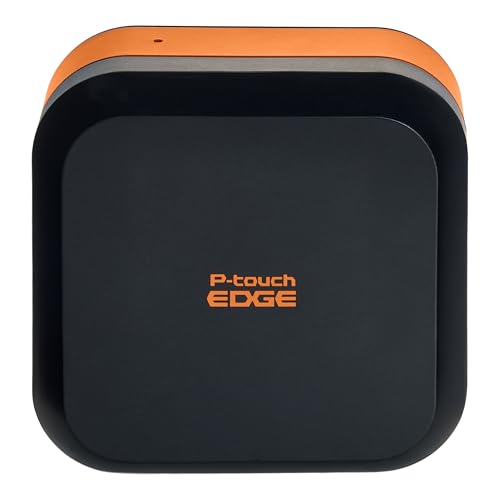
The Brother PT-E720BT is a portable industrial label printer with Bluetooth connectivity for use with a professional labeling app. It prints laminated labels up to about 1 inch wide that are made for industrial environments. The listing mentions it can be attached to a belt or ladder with optional accessories.
Best for: This is ideal for professionals who need hands-free, Bluetooth-enabled printing of durable labels on a job site.
12. Best for basic, no-frills industrial labeling: Brady M210 Handheld Label Maker

Pros
- Industrial brand
- Handheld design
Cons
- The listing provides almost no feature information
- The listing does not mention tape type or power source
The Brady M210 is a handheld label maker. The Amazon listing provides minimal feature details beyond the product name and basic dimensions. It is a yellow and black unit, suggesting an industrial or professional design.
Best for: Consider this if you need a straightforward, industrial-grade handheld label maker and plan to research its full specs from the manufacturer directly.
13. Best for crafting and retro 3D labels: EazeID Vintage Embossing Label Maker

Pros
- Creates durable, waterproof 3D labels
- No batteries or power required
- Includes a starter kit with tapes
Cons
- Manual operation is slower
- Limited to 9mm wide tape
The EazeID Label Maker is a manual, handheld embosser that creates raised 3D labels on 3/8 inch (9mm) wide tapes. The starter kit includes tapes and embossing wheels for letters, numbers, and symbols. The listing states the embossed tapes are waterproof and have strong adhesion.
Best for: This is a fun, tactile choice for craft projects, scrapbooking, labeling kids’ items, or creating vintage-style labels without ink or power.
How to choose the best label maker for organizing
Choosing the right label maker depends on where and how you plan to use it. The first decision is between a traditional model with a built-in keyboard and a modern Bluetooth printer that uses a smartphone app. Keyboard models, like our overall pick, are often simpler for quick, one-off labels at a desk. App-connected printers offer far more design flexibility, including adding images and QR codes, but require your phone to be handy.
Next, consider the label tape. Width is a key spec; standard home organization often uses ½-inch tape, while labeling large bins or creating product labels may need widths of an inch or more. Also check tape compatibility—some machines only work with their own brand’s tape cartridges. Finally, think about power. Battery-powered units offer portability, but a rechargeable battery or AC adapter option is convenient for longer sessions. For heavy-duty use in a workshop or garage, look for industrial models that mention durable, laminated labels.
What to look for
- Connectivity: Do you prefer a standalone keyboard model or a compact Bluetooth printer that uses a smartphone app for designs?
- Tape Width & Type: Match the tape width to your items (e.g., ½” for jars, 1″+ for bins). Check if tapes are laminated for durability or waterproof for kitchen/bathroom use.
- Power Source: Battery-only for portability, rechargeable for convenience, or AC adapter for stationary, high-volume labeling.
FAQ
Are label maker tapes reusable?
Most adhesive label tapes are not designed to be reused. Once applied, removing them can damage the label or the surface. However, some specialty tapes, like dissolvable labels for jars, are designed for temporary use. For a system where you need to change labels frequently, consider using label holders that allow you to swap out paper inserts.
Can I use any brand of tape in my label maker?
Generally, no. Label makers are typically designed to work with proprietary tape cassettes from the same brand to ensure proper feeding and printing. Using off-brand or incompatible tapes can cause jams and may void the warranty. Always check the manufacturer’s specifications for compatible tape models.
What’s the difference between thermal and ink label makers?
Thermal label makers (including most Bluetooth models) use heat to create an image on specially coated tape, requiring no ink, toner, or ribbons. This means less mess and lower ongoing costs. Traditional label makers often use a thermal transfer or ink-based system where a ribbon transfers ink onto the tape. The labels from thermal-only printers can sometimes fade if exposed to direct sunlight or heat over long periods, while laminated tapes from other models offer more durability.
How do I organize before I start labeling?
Labeling is the final step in organizing, not the first. Begin by sorting your items into categories. Then, declutter and find appropriate containers for what you’re keeping. Once everything has a designated home, use your label maker to clearly identify those homes. For a full guide, see our article on decluttering your home step by step.
References
- Amazon product listings and manufacturer specifications (accessed October 2026)
- Decluttering Basics category page, Your Home Is Organized.
- How to Sort Items When Decluttering: A Practical System, Your Home Is Organized.
- Decluttering Your Home Step by Step, Your Home Is Organized.